Finding a good drum plugin without spending money is not easy. Many free drum tools are either too limited, poorly maintained, or lack realistic grooves. That is why JDrummer, an open-source drum plugin created by Justin Ehrlichman, has been getting attention among budget-conscious music producers.
JDrummer is a free VST3 drum instrument built using the JUCE framework. It is designed to function as a practical alternative to commercial drum plugins like EZDrummer, especially for producers who want flexibility, MIDI control, and zero cost.
JDrummer is a drum machine and groove generator that combines drum kits, MIDI grooves, and arrangement tools into one plugin. It runs on Windows and Linux, making it especially valuable for Linux-based producers who often have fewer plugin options.
The plugin is completely open source and released under the GPL-3.0 license, meaning you can use it freely without restrictions or hidden paywalls.
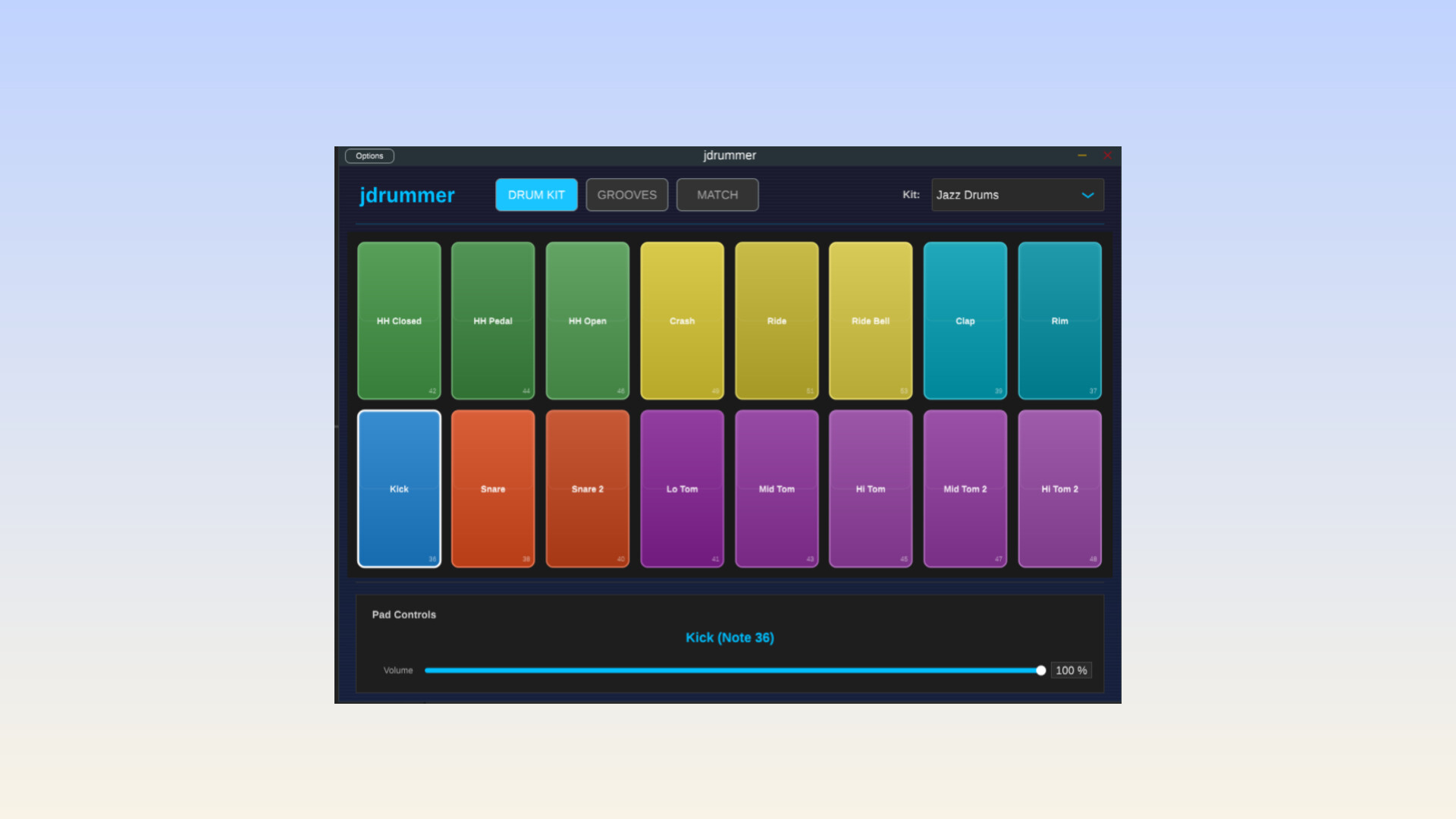
One of JDrummer’s strengths is its use of SoundFont (.sf2) technology. The plugin comes with 29 built-in SoundFont drum kits, covering a wide range of styles:
• Acoustic kits for rock, jazz, and pop
• Electronic kits like 808-style and dance drums
• Orchestral percussion
• Experimental and industrial-style kits
Each kit is mapped across a 16-pad grid, with velocity-sensitive playback. You can adjust volume and panning per pad, making it easy to shape the drum balance without leaving the plugin.
Even better, JDrummer allows you to load your own SoundFont drum kits, giving you full control over your sound library.
JDrummer includes a large groove browser packed with tempo-synced MIDI drum patterns. These grooves cover basic beats, swing rhythms, fills, breakbeats, and more.
The workflow is simple:
• Preview grooves inside the plugin
• Sync them automatically to your project tempo
• Drag and drop them directly into your DAW as MIDI clips
• Once exported, you can edit the MIDI freely, swap kits, or trigger other drum plugins if you want.
Unlike many free drum plugins, JDrummer includes a composer and arrangement section. This allows you to string multiple grooves together inside the plugin to create full drum parts for songs.
You can build intros, verses, choruses, and fills, then export the entire arrangement as a single MIDI file. This is extremely useful for songwriting, demos, and fast beat creation.
One of the most interesting features in JDrummer is the Groove Matcher. This tool lets you load an audio file, such as a drum loop or song reference, and JDrummer will analyze the rhythm and BPM.
After analysis, the plugin suggests MIDI grooves that closely match the timing and feel of the audio. This feature is rare in free plugins and can save a lot of time when recreating drum patterns or building similar grooves.
JDrummer is lightweight and runs smoothly on most systems. However, it is not designed to compete with premium drum plugins in terms of realism or built-in effects. There are no advanced mixers, mic bleed controls, or high-end processing tools.
Also, macOS is not currently supported, which may be a dealbreaker for some producers. It feels like Mac Users were left out on purpose haha.
JDrummer is an impressive free drum plugin that offers far more than most open-source instruments. With built-in kits, MIDI grooves, arrangement tools, and intelligent groove matching, it provides real value for producers on a budget.
If you are looking for a free drum plugin for Windows or Linux, especially one that focuses on MIDI flexibility and workflow, JDrummer is absolutely worth checking out.