what you see can be just as important as what you hear. Stereo imaging, phase coherence, and balance are critical elements of a professional-sounding mix, yet they are often misunderstood or ignored. This is where PSP Stereo Analyser by PSP Audioware comes in. It’s a powerful free stereo analysis plugin designed to give you clear visual feedback about what’s happening in your stereo field.
Unlike stereo enhancers or wideners, PSP Stereo Analyser does not alter your sound. Instead, it helps you make better decisions by showing accurate, real-time stereo information.
PSP Stereo Analyser (also known as PSP stereoAnalyser2) is a stereo metering and visualization plugin that allows you to analyze left/right balance, phase correlation, and stereo width. It’s commonly used during mixing and mastering to ensure your audio translates well across different playback systems, including mono devices.
Because it’s purely an analysis tool, it’s safe to place anywhere in your signal chain without affecting audio quality.
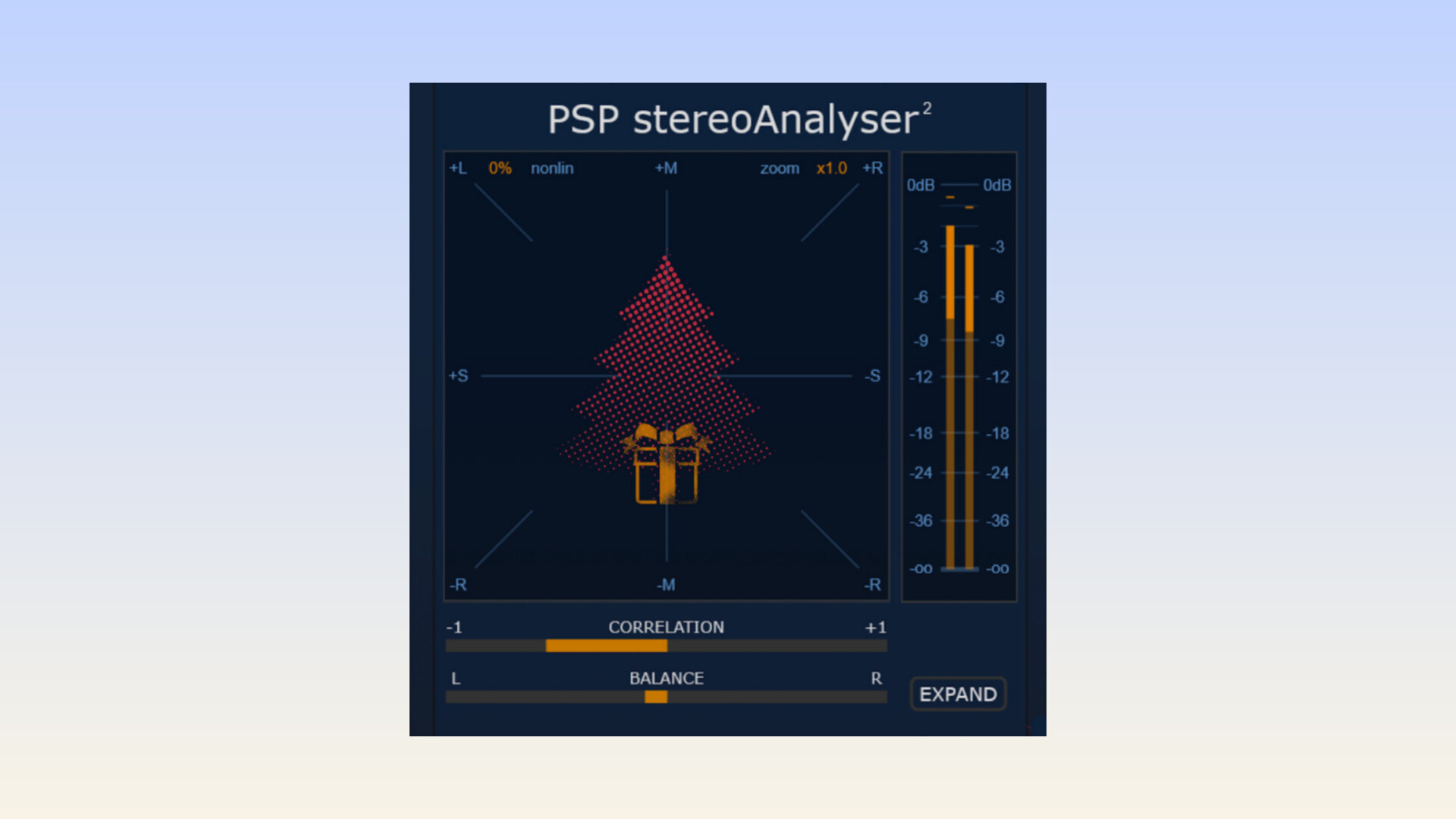
At the heart of PSP Stereo Analyser is the X-Y goniometer, which visually represents the relationship between the left and right channels. A tight, centered display usually indicates mono or narrow content, while a wide spread shows stereo width. This display makes it easy to spot excessive widening or phase problems at a glance.
The correlation meter is one of the most important features, especially for mastering. Values close to +1 indicate good mono compatibility, while values near 0 or negative suggest phase cancellation issues. This helps you avoid mixes that sound wide in stereo but collapse badly in mono.
PSP Stereo Analyser includes both peak and RMS meters, giving you insight into transient peaks as well as average signal levels. This is useful when checking balance between the left and right channels or comparing perceived loudness.
The balance meter shows whether one side of the stereo image is louder than the other. Even small imbalances can affect how professional a mix feels, and this visual feedback makes corrections easier and faster.
One standout feature is the ability to apply high-pass and low-pass filters to the analysis. This allows you to focus on specific frequency ranges. For example, you can check whether your low end is properly centered while keeping higher frequencies wide, a common best practice in modern mixing.
PSP Stereo Analyser also includes a listening mode, letting you audition only the filtered frequency range you’re analyzing. This connects the visual information directly to what you hear, making the analysis more practical and intuitive.
The plugin features a clean, resizable interface, making it comfortable to use on both small and large screens. It supports A/B comparison, preset management, and undo/redo functions, which are especially useful when comparing different mix stages.
Under the hood, it uses 64-bit internal processing and supports sample rates up to 384 kHz, ensuring accurate analysis even in high-resolution projects.
• Recording: Check stereo microphone setups like drum overheads or room mics for phase issues before committing to takes.
• Mixing: Monitor stereo width, balance, and mono compatibility while placing instruments in the mix.
• Mastering: Final verification of stereo integrity before releasing music to streaming platforms, radio, or clubs.
PSP Stereo Analyser is available for Windows and macOS, including Apple Silicon systems. It supports VST, VST3, AU, and AAX formats, making it compatible with most major DAWs.
Best of all, it is completely free, requiring only a PSP Audioware user account to download.
PSP Stereo Analyser is an excellent example of how a simple tool can make a big difference. If you want better stereo balance, improved mono compatibility, and a clearer understanding of your mixes, this plugin is an easy recommendation. For producers and engineers on a budget, it’s a must-have addition to any mixing or mastering setup.