Distortion is one of the most powerful tools in music production. From subtle saturation to aggressive sound destruction, it can completely change the personality of a sound. While many distortion plugins come with complex interfaces and endless parameters, Volture by unAbleton takes the opposite approach. It is simple, fast, and effective.
Volture is a free distortion VST3 plugin for Windows, available via the unAbleton Ko fi page. Despite its minimal design, it delivers bold character and punch, making it especially useful for synths, basslines, drums, and creative sound design.
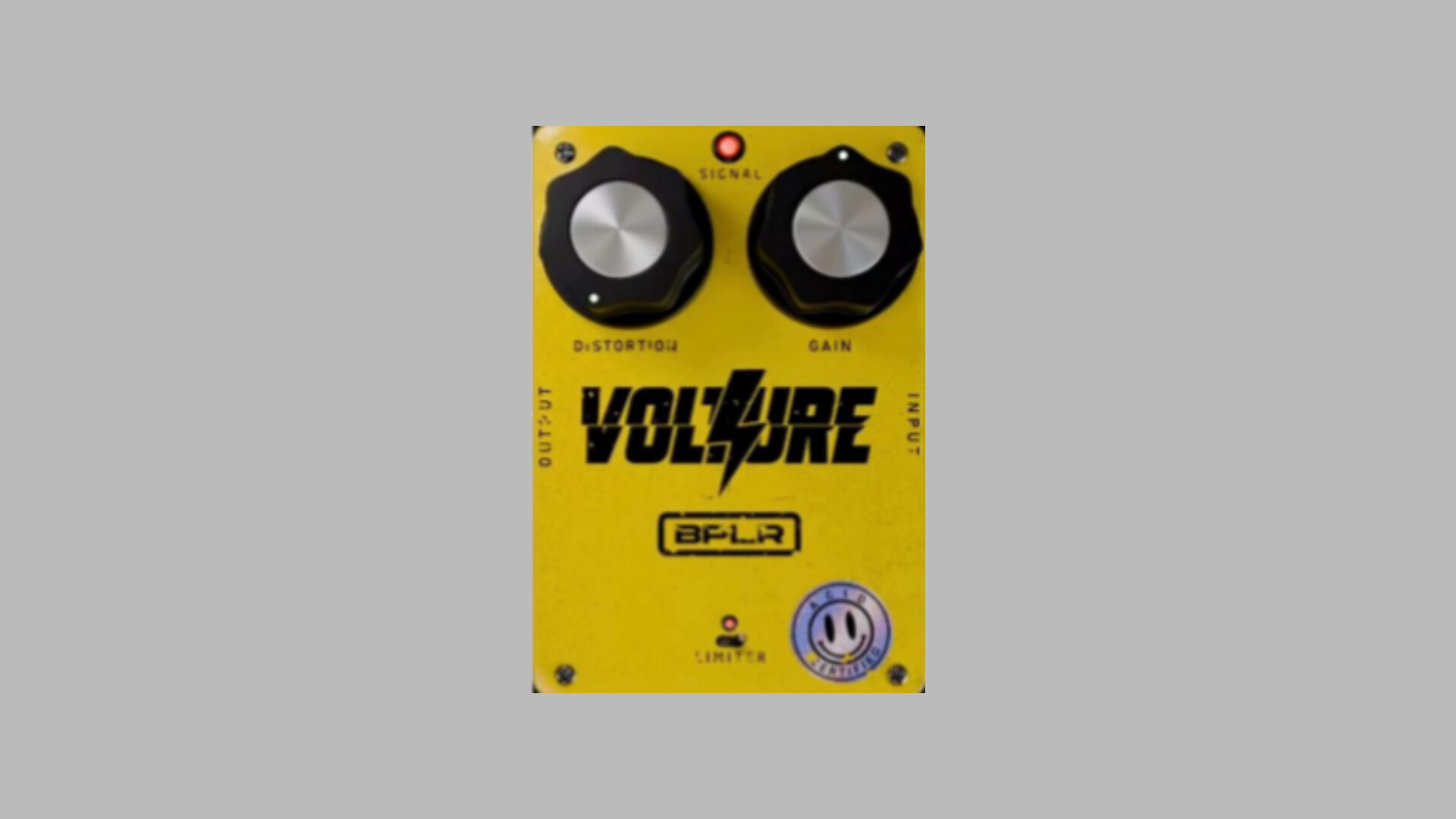
Volture is a stompbox style distortion plugin built to deliver instant results without overwhelming the user. It focuses on hands on control rather than deep technical tweaking, making it ideal for beginners and experienced producers who want quick inspiration.
The plugin is distributed as a VST3 64 bit plugin and is designed for Windows systems only. It works in most modern DAWs such as FL Studio, Ableton Live, Cubase, Studio One, and Reaper, as long as VST3 plugins are supported.
Best of all, Volture is free, with an optional pay what you want model for users who want to support the developer.
One of Volture’s biggest strengths is its minimal interface. The plugin keeps things intentionally simple, allowing you to focus on sound rather than settings.
Volture features just two main knobs which control distortion intensity, meaning how hard the signal is driven, and gain or stability, which determines how controlled or aggressive the distortion behaves.
This stripped down design makes it extremely easy to dial in usable sounds within seconds.
Under the hood, Volture includes a built in limiter, which helps prevent extreme volume spikes when pushing the distortion hard. This is especially useful when working on drums or bass, where uncontrolled distortion can easily clip or overpower a mix.
The limiter allows you to experiment aggressively while keeping things manageable.
Volture delivers a raw, gritty distortion that works particularly well on electronic sounds. It is not a transparent saturator. It adds noticeable color and attitude.
Volture adds warmth and harmonic grit, can move from subtle saturation to heavy distortion, works well for acid basslines, synth leads, and drum loops, and adds punch without sounding overly digital.
Because the plugin is lightweight and straightforward, it fits easily into fast workflows and sound design sessions.
Volture shines in several production scenarios.
Synths and Basslines
Volture is excellent on 303 style basslines, leads, and pads. It adds aggression and presence, making synths cut through dense mixes.
Drums
Use it on kicks, snares, or entire drum loops to add bite and character. Even subtle settings can help drums sound more energetic.
Guitars and Bass
While not a full amp simulator, Volture works well on DI guitar and bass tracks, adding edge and texture.
Creative Sound Design
Volture is also useful on effects, risers, and buses. Applying light distortion across multiple elements can help glue a mix together and add cohesion.
Supported
Volture supports Windows 64 bit systems, the VST3 format, and most modern DAWs.
Not Supported
Volture does not support macOS, AU, or AAX formats.
To install, place the VST3 file into your system’s VST3 folder, commonly located at C Program Files Common Files VST3, then rescan plugins in your DAW.
Start with low gain settings and increase gradually. Use EQ after distortion to shape harsh frequencies. Try parallel distortion on drums for extra punch. Stack Volture with filters or modulation effects for creative sound design.
Because of its simplicity, Volture is perfect for experimentation.
Volture by unAbleton proves that great sound does not require complex tools or expensive plugins. Its simple design, aggressive character, and built in limiter make it a solid choice for producers looking to add grit and personality to their tracks without slowing down their workflow.
If you are a budget conscious music producer or someone who enjoys fast, hands on tools, Volture is absolutely worth adding to your plugin collection.